 CASE STUDY
 UI Rendering Bug in IntelliJ Nx Console - A QA Case Study

Debugging UI Glitches in Developer Tools
A QA Case Study on IntelliJ IDEA's Nx Console Plugin
"Quality is not only about catching bugs but about enhancing every user’s interaction — even for developers." – Jubair Rahman
Introduction
While most QA engineers focus on end-user applications, we often overlook developer tools — which are also user interfaces that deserve attention. In this case study, I explore a real-world UI rendering issue in the Nx Console Plugin for IntelliJ IDEA, sharing how I investigated, documented, and contributed back to the community.
The Bug at a Glance
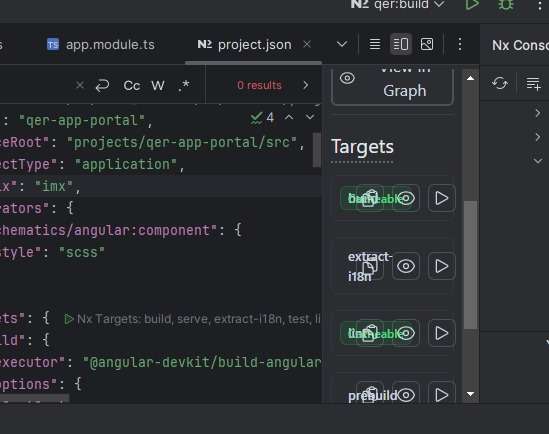
While using the Nx Console plugin in IntelliJ, I noticed that the action buttons (e.g., run, graph, extract-i18n, etc.) under each project target were visually overlapping and misaligned.
Usability Impact:
- Difficult to click specific buttons
- Reduced visual clarity
- Affected Developer Experience (DX)
Screenshots
- Overlapping Target Buttons

- Misalignment of Icons

These issues, though minor at a glance, negatively impact usability and workflow efficiency.
Steps to Reproduce
- Open a project with Nx workspace in IntelliJ IDEA.
- Ensure Nx Console Plugin is installed and enabled.
- Navigate to the Nx Console panel.
- Select any project → go to Targets.
- Observe the layout of action buttons.
Test Strategy Summary
A combination of exploratory and visual testing was applied:
- UI Testing: Checked layout, spacing, and alignment
- Exploratory Testing: Navigated across features and settings
- Visual Regression: Compared with VS Code’s Nx Console behavior
Metrics Tracked:
- Number of affected targets
- Frequency of glitches across themes
- Interaction consistency
Test Plan Highlights
Objective:
Validate UI layout of the Nx Console Plugin in IntelliJ IDEA.
Scope:
✅ UI rendering and layout
❌ Target functionality logic
Tools Used:
- IntelliJ IDEA 2023+
- Nx Console Plugin (latest)
- Windows 10/11
Deliverables:
Screenshots, test plan, test cases, GitHub repo
Root Cause Hypothesis
Potential causes may include:
- DPI scaling or font rendering inconsistencies
- Static layout design in plugin code
- Lack of responsive/adaptive rendering logic
Workarounds Explored
- Resize Nx Console panel to trigger a refresh
- Reset zoom: Ctrl + 0
- Use VS Code for smoother plugin rendering
- Reported issue to Nx Console GitHub tracker
GitHub Repo & Documentation
All findings are available here:
👉 UI Rendering Bug: IntelliJ Nx Console – GitHub Repo
Structure:
css
CopyEdit
📁 UI-Rendering-Issue-IntelliJ-NxConsole
├── README.md
├── img/
│   ├── overlap1.jpeg
│   ├── overlap2.jpeg
│   └── jubair_profile.jpg
└── test-docs/
    ├── test-plan.md
    ├── test-cases.md
    └── test-strategy.md
👨💻 About the Author
Jubair Rahman
Software Engineer (QA) | HealthTech | UI Quality Enthusiast
LinkedIn || GitHub || WhatsApp
Final Thoughts
QA isn’t just about functionality — it’s also about ensuring intuitive, frustration-free UI, even in internal or developer-facing tools.
Visual bugs, when left unaddressed, degrade both trust and efficiency.
Start contributing to quality today: observe, document, and share.