CASE STUDY
 Test Smarter, Not Harder: Detailed Failure Debugging in Selenium
In professional UI automation, simply knowing whether a test passed or failed isn't enough. We need clear logs and screenshots - especially when debugging real failures in dynamic web applications.
This guide walks through how we can:
✅ Log test lifecycle events automatically
✅ Capture screenshots on failure
✅ Attach screenshots to Allure reports
✅ Use a proper TestListener class for reliable logging and reporting
✅ Write test logs (including failure reasons) and screenshots to files under target/
🗂️ Recommended Project Structure
project-root/
├── src/
│   └── test/java/
│       ├── configuration/
│       │   ├── BaseClass.java
│       │   └── BasePage.java
│       ├── listeners/
│       │   └── TestListener.java
│       ├── pages/
│       │   └── LoginPage.java
│       └── tests/
│           └── LoginTest.java
├── target/
│   ├── screenshots/
│   └── test-log.txt
├── pom.xml
└── testngSuite.xml
🧪 Logging & Screenshot Utility in Listener
Create a new class TestListener.java in listeners package:
public class TestListener implements ITestListener {
    private WebDriver driver;
    private static final Path logFile = Paths.get("target", "test-log.txt");
    private BufferedWriter writer;

    // Clear log file before suite@Overridepublic void onStart(ITestContext context) {try {
            Files.createDirectories(logFile.getParent());
            Files.deleteIfExists(logFile);
            writer = Files.newBufferedWriter(logFile, StandardOpenOption.CREATE, StandardOpenOption.APPEND);
            logToFile("Test Suite started at " + LocalDateTime.now().format(DateTimeFormatter.ISO_LOCAL_DATE_TIME));
        } catch (IOException e) {
            e.printStackTrace();
        }
    }

    // Close writer after suite@Overridepublic void onFinish(ITestContext context) {try {
            logToFile("Test Suite finished at " + LocalDateTime.now().format(DateTimeFormatter.ISO_LOCAL_DATE_TIME));
            if (writer != null) {
                writer.close();
            }
        } catch (IOException e) {
            e.printStackTrace();
        }
    }

    private void logToFile(String message) {
        try {
            writer.write(message);
            writer.newLine();
            writer.flush();
        } catch (IOException e) {
            e.printStackTrace();
        }
    }

    @Overridepublic void onTestStart(ITestResult result) {
        String msg = "TEST STARTED: " + result.getMethod().getMethodName();
        Reporter.log(msg, true);
        logToFile(msg);
    }

    @Overridepublic void onTestSuccess(ITestResult result) {
        String msg = "TEST PASSED: " + result.getMethod().getMethodName();
        Reporter.log(msg, true);
        logToFile(msg);
    }

    @Overridepublic void onTestFailure(ITestResult result) {
        String msg = "TEST FAILED: " + result.getMethod().getMethodName();
        Reporter.log(msg, true);
        logToFile(msg);

        Throwable cause = result.getThrowable();
        if (cause != null) {
            String causeMsg = "Cause: " + cause.getMessage();
            Reporter.log(causeMsg, true);
            logToFile(causeMsg);
        }

        Object testClass = result.getInstance();
        driver = ((BaseClass) testClass).getDriver();

        attachScreenshotToAllure(result.getMethod().getMethodName());
    }

    @Overridepublic void onTestSkipped(ITestResult result) {
        String msg = "TEST SKIPPED: " + result.getMethod().getMethodName();
        Reporter.log(msg, true);
        logToFile(msg);
    }

    public void attachScreenshotToAllure(String testName) {
        try {
            byte[] screenshot = ((TakesScreenshot) driver).getScreenshotAs(OutputType.BYTES);
            saveScreenshotToFile(testName, screenshot);
            Allure.addAttachment("Failure Screenshot - " + testName, new ByteArrayInputStream(screenshot));
        } catch (Exception e) {
            e.printStackTrace();
        }
    }

    public void saveScreenshotToFile(String testName, byte[] screenshot) throws IOException {
        String timestamp = new SimpleDateFormat("yyyyMMdd_HHmmss").format(new Date());
        Path destination = Paths.get("target", "screenshots", testName + "_" + timestamp + ".png");
        Files.createDirectories(destination.getParent());
        Files.write(destination, screenshot);
    }

}
🚀 BaseClass Setup
public class BaseClass {
    public static WebDriver driver;

    public WebDriver getDriver() {
        return driver;
    }

    @BeforeSuitepublic void beforeSuite() {
        driver = new ChromeDriver();
        driver.manage().window().maximize();
        driver.navigate().to(Data.BASE_URL);
        WebDriverWait wait = new WebDriverWait(driver, Duration.ofSeconds(10));
        wait.until(ExpectedConditions.titleContains(Data.TITLE));
    }

    @AfterSuitepublic void afterSuite() {
        if (driver != null) {
            driver.quit();
        }
    }
}
✅ Real Login Test (AutomationExercise)
@Epic("Login")
@Feature("Login to your account")
public class LoginTest extends BaseClass {
    static HomePage homePage;
    static LoginPage loginPage;
    @Test(description = "Verify user can login successfully with valid credentials.")
    @Severity(SeverityLevel.CRITICAL)
    @Story("Login with valid credentials")
    @Owner("Suraiya Akter")
    @Link(name = "Story Link", url = "....")
    public static void loginTest() {
        homePage = new HomePage(driver);
        loginPage = new LoginPage(driver);
        waitForElementToBeVisible(homePage.getLoginFromNavBar(), 10);
        homePage.getLoginFromNavBar().click();
        waitForElementToBeVisible(loginPage.getEmailField(), 10);
        loginPage.getEmailField().click();
        loginPage.getEmailField().sendKeys(Data.EMAIL);
        loginPage.getPasswordField().click();
        loginPage.getPasswordField().sendKeys(Data.PASSWORD);
        loginPage.getLoginButton().click();
        waitForElementToBeVisible(loginPage.getProfile(), 10);
        Assert.assertEquals(loginPage.getProfile().getText(), Data.LOGGED_IN_TEXT, "Invalid Credentials");
    }
}
🧩 Listener Setup in testngSuite.xml
<suite name="Regression Tests" parallel="methods" thread-count="1">
  <listeners>
    <listener class-name="listeners.TestListener"/>
  </listeners>
  <test name = "Test">
    <classes>
      <class name="testCases.LoginTest"/>
    </classes>
  </test>
</suite>
🌟 Behind-the-Scenes Magic: Logging Made Easy
This setup gives us a clean, scalable solution for identifying and debugging test failures in Selenium UI automation. We've applied it on the login functionality of AutomationExercise, which serves as a real-world example of dynamic web UI interaction and validation.
🧩 How It All Works (Without the Mess):
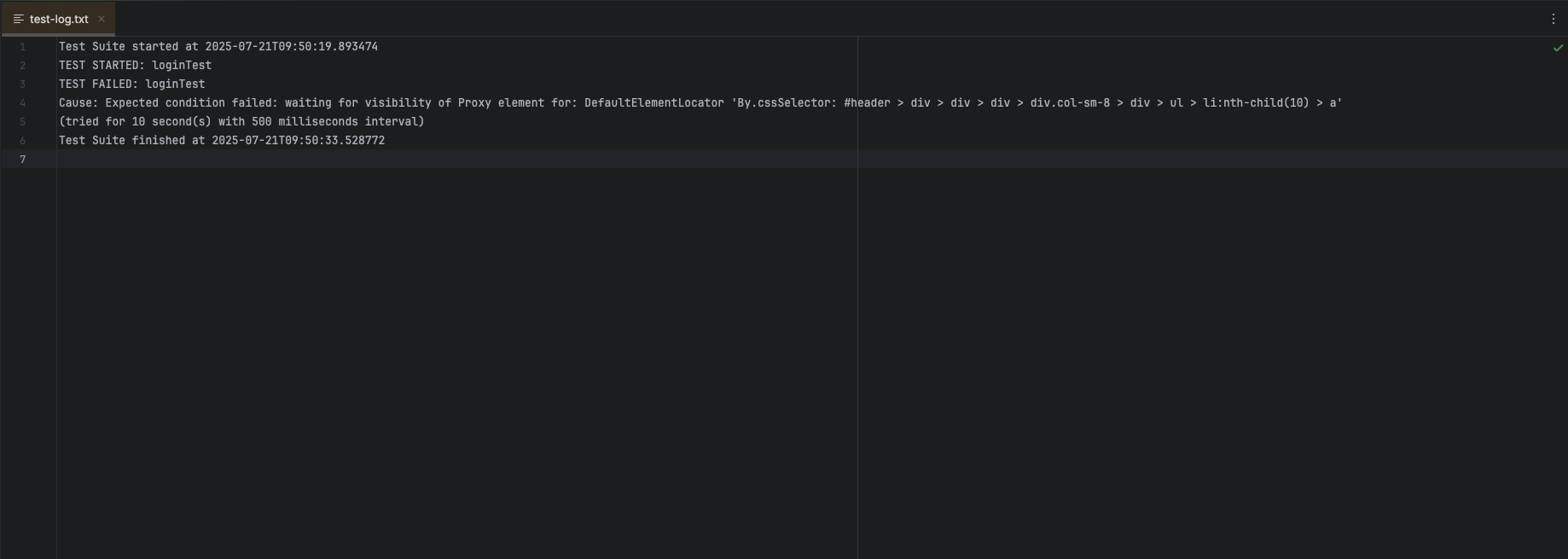
- Test lifecycle events - including start, success, failure, and skip - are automatically logged both to the console and to a target/test-log.txt file.
- On test failure:
- The test method name is clearly marked as failed.
- The root cause of failure is extracted from the thrown exception and logged with a short description (e.g., Element not found, Timeout while waiting for element).
- The stack trace is saved in detail, line-by-line, for easier analysis of where and why the error occurred.
- A screenshot is captured immediately at the moment of failure and stored under target/screenshots/ with a timestamped filename.
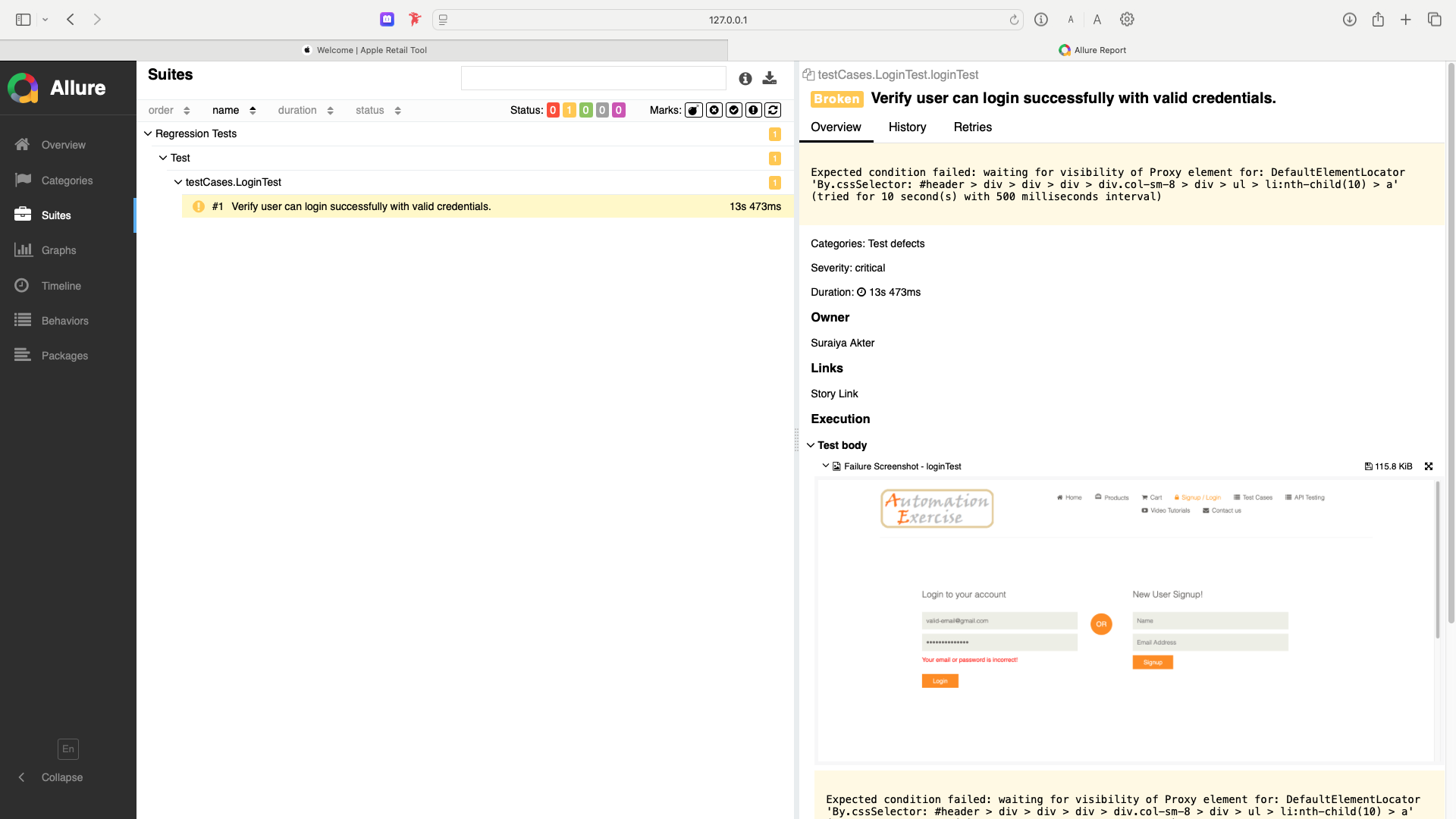
- The screenshot is also attached to the Allure Report for quick visual inspection.
- The test-log.txt and screenshots remain organized under the target/ folder, which is automatically cleaned on each mvn clean test run.
By using this listener-based logging approach, we eliminate the need for System.out.println or any manual debugging - gaining structured, reusable, and sharable artifacts for every test execution.
This makes our automation framework:
- Easier to maintain
- Easier to debug
- Ready for integration with reporting tools and CI pipelines
All of this comes with minimal code in the test itself, keeping our test logic clean and focused.
Refer to the image of the log.txt file provided below:
The image of Allure Report is given below: