 TESTING TOOLS
 Stability Software Testing

Software applications must perform flawlessly, consistently, and reliably over extended periods, often under varying operational conditions. This imperative underscores the critical importance of stability software testing, a specialized form of quality assurance designed to validate an application's resilience and enduring performance. This article delves into the intricacies of stability testing, exploring its definition, objectives, methodologies, common challenges, and best practices, ultimately highlighting its indispensable role in delivering high-quality, dependable software.
What is Stability Software Testing?
Stability software testing is a non-functional testing technique focused on evaluating how a software application behaves and performs consistently over prolonged periods of continuous operation. The primary goal is to ensure the application remains robust, reliable, and functional without experiencing degradation, failures, or unexpected behavior under normal and peak conditions. Unlike functional tests that verify specific features or performance tests that measure speed under load, stability testing delves into the application's endurance, seeking to uncover issues that only manifest after sustained usage.
Essentially, stability testing assesses the software's ability to maintain its intended state and performance characteristics over time. It examines the system's resilience to continuous operation, its capacity to manage resources effectively, and its overall ability to prevent crashes, slowdowns, memory leaks, or other forms of degradation that can arise from extended use.
Why is Stability Testing Crucial?
The significance of stability testing extends far beyond simple bug detection. It is a cornerstone of quality assurance, offering multifaceted benefits that contribute directly to user satisfaction, operational efficiency, and business reputation.
- Ensuring Continuous Performance and Uptime: In today's always-on digital world, applications are expected to operate 24/7. Stability testing verifies that software can handle sustained usage without performance degradation, ensuring consistent service delivery and minimal downtime.
- Preventing Catastrophic Failures: Prolonged operation can expose latent defects that lead to application crashes, freezes, or system failures. Stability testing proactively identifies these vulnerabilities, allowing development teams to address them before they impact end-users.
- Identifying Hidden Resource Leaks: Memory leaks, inefficient CPU utilization, or improper handling of network connections often become apparent only after an application has been running for an extended duration. Stability testing is highly effective in detecting these subtle but critical resource exhaustion issues.
- Enhancing User Experience and Trust: A stable application provides a seamless and predictable user experience, free from unexpected errors or sluggishness. This consistency builds user trust and fosters loyalty, directly impacting customer satisfaction.
- Reducing Maintenance Costs and Technical Debt: Detecting and resolving stability issues early in the development cycle is significantly less costly than addressing them post-release. By proactively identifying problems, stability testing helps reduce technical debt and associated maintenance overheads.
- Meeting Service Level Agreements (SLAs): Many software products operate under strict SLAs regarding uptime and performance. Stability testing provides the data and assurance needed to meet these contractual obligations, mitigating potential financial penalties and reputational damage.
- Supporting Scalability and Robustness: While not solely focused on maximum load, stability testing indirectly contributes to scalability by ensuring the foundational components of an application remain stable under continuous, even if not peak, demand. It confirms the system's ability to handle operational parameters robustly.
Stability Testing vs. Other Performance Tests
Stability testing is often discussed alongside other non-functional testing types, particularly those related to performance. While interconnected, their objectives and methodologies have distinct nuances.
- Load Testing: Focuses on evaluating an application's behavior under an anticipated or expected user load. It determines if the system can handle the designed workload and identifies performance bottlenecks under normal operating conditions.
- Stress Testing: Aims to push the application beyond its normal operational capacity to determine its breaking point and how it recovers from extreme conditions. It seeks to uncover stability issues under severe strain, often leading to resource exhaustion or crashes.
- Soak/Endurance Testing: This is effectively a specific type or a synonym for stability testing, specifically emphasizing prolonged, continuous load over many hours or days. Its primary purpose is to detect resource leaks (memory, connections) and performance degradation that only emerge over extended periods.
- Spike Testing: Involves subjecting the application to sudden and drastic increases or decreases in user load to observe its behavior and recovery mechanisms during abrupt changes in demand.
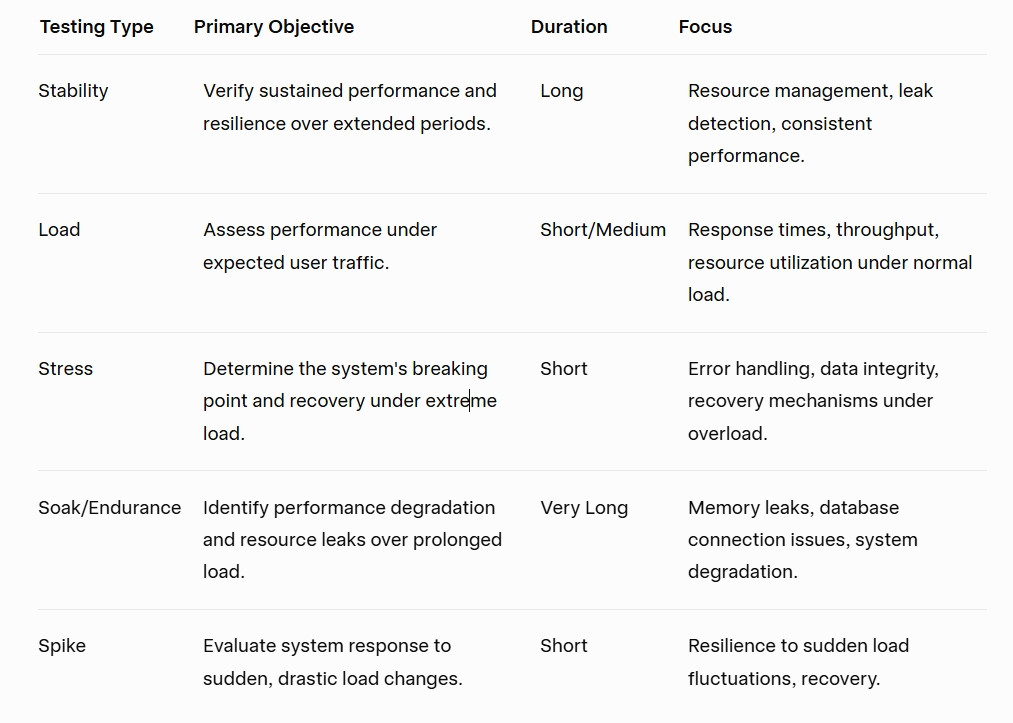 comparison table
Key Objectives of Stability Testing
The overarching goal of stability testing is to ensure an application's long-term operational integrity. This breaks down into several specific objectives:
- Validate Application Integrity: Confirm that the software maintains its core functionality and data integrity throughout extended periods of operation.
- Discover Memory Leaks and Resource Exhaustion: Identify instances where the application continuously consumes increasing amounts of memory, CPU cycles, or other system resources without releasing them, leading to performance degradation or crashes.
- Confirm Consistent Response Times: Ensure that the application's response times remain consistent and within acceptable thresholds, even after hours or days of continuous use.
- Verify Data Integrity: Ascertain that continuous read/write operations or data processing does not lead to data corruption or inconsistencies over time.
- Assess System Recovery Mechanisms: Observe how the system behaves and recovers if minor, transient issues occur during a prolonged test, ensuring graceful degradation rather than abrupt failure.
Common Stability Issues Uncovered
Stability testing is adept at unearthing a range of issues that often lie dormant during shorter testing cycles. These typically include:
- Memory Leaks: The most frequently identified stability issue, where an application fails to release unused memory, leading to its eventual exhaustion and system slowdowns or crashes.
- Resource Exhaustion: Beyond memory, this includes issues with CPU utilization spiraling out of control, network sockets not being closed, or excessive disk I/O, all leading to system performance degradation.
- Database Connection Pooling Issues: Improper management of database connections can lead to resource starvation, affecting application responsiveness and eventually causing failures.
- Thread Deadlocks or Livelocks: Concurrency issues where threads block each other indefinitely, preventing further processing and effectively freezing parts of the application.
- Performance Degradation over Time: Even without outright crashes, an application might become progressively slower or less responsive the longer it runs due to accumulating overhead or inefficient resource management.
- Application Crashes/Freezes: Complete cessation of application functionality or an unresponsive state that requires manual intervention.
- Unexpected Error Accumulation: While individual errors might be handled, a continuous accumulation of minor errors could point to underlying instability that might eventually lead to a major issue.
- System Hangs: The application stops responding entirely, requiring a restart.
The Process of Conducting Stability Testing
Effective stability testing requires a structured approach, encompassing planning, execution, and analysis.
1. Planning and Strategy
- Define Scope and Objectives: Clearly articulate what aspects of the system will be tested, under what conditions, and what specific stability metrics are crucial.
- Establish Success Criteria: Define acceptable thresholds for memory usage, CPU load, response times, error rates, and the maximum allowed duration of uninterrupted operation.
- Determine Test Duration: Stability tests are inherently long-running, often extending from several hours to several days or even weeks, depending on the application's nature and criticality.
- Identify Key Scenarios: Focus on critical business workflows, high-transaction areas, and components known to be resource-intensive.
2. Environment Setup
- Mirror Production Environment: The test environment should closely replicate the production environment in terms of hardware, software, network configuration, and data volume to ensure realistic results.
- Dedicated Resources: Stability tests often require dedicated infrastructure to avoid interference from other testing activities and to provide accurate resource utilization metrics.
- Monitoring Tools Integration: Implement robust monitoring tools to collect real-time data on system performance, resource usage, and application logs throughout the test duration.
3. Test Case Design
- Realistic Usage Patterns: Design test scripts that simulate typical and peak user behavior patterns, ensuring a continuous and representative workload.
- Prolonged Scenarios: Create long-running scenarios that mimic continuous user interaction, data processing, or background tasks to expose endurance-related issues.
- Varying Conditions: Optionally introduce controlled variations in load, data input, or system conditions to assess resilience.
4. Test Execution
- Long-Running Tests: Execute the designed test cases for the predetermined extended duration.
- Continuous Monitoring: Actively monitor the system's behavior using integrated tools, observing memory, CPU, disk, network usage, database connections, and application-specific metrics.
- No Manual Intervention: Ideally, the tests should run autonomously to truly simulate continuous operation without human interference.
5. Data Collection and Analysis
- Performance Metrics: Collect detailed data on response times, throughput, error rates, and resource utilization (CPU, memory, disk I/O, network I/O).
- Application Logs: Scrutinize application and system logs for error messages, warnings, and unusual patterns that may indicate underlying issues.
- Trend Analysis: Look for gradual degradation in performance or increasing resource consumption over time, which are hallmarks of stability problems.
- Root Cause Analysis: For identified issues, conduct thorough root cause analysis to understand the underlying defect.
6. Reporting and Remediation
- Comprehensive Reports: Document all findings, including observed performance degradation, resource leaks, crashes, and their impact.
- Prioritize Issues: Classify and prioritize identified issues based on their severity and impact on system stability.
- Collaboration: Work closely with development teams to communicate findings and facilitate the remediation process.
- Retesting: After fixes are implemented, re-execute stability tests to verify that the issues are resolved and no new problems have been introduced.
Best Practices for Effective Stability Testing
To maximize the efficacy of stability testing, organizations should adopt several key best practices:
- Start Early in the SDLC: Integrate stability testing considerations from the early design and development phases. Identifying potential architectural weaknesses that could lead to instability early on is far more efficient than fixing them later.
- Automate Testing and Monitoring: Manual execution of long-running tests is impractical and error-prone. Leverage automation tools for test execution, data generation, and continuous monitoring to ensure consistency and efficiency.
- Simulate Real-World Scenarios Accurately: The more closely your test scenarios mimic actual user behavior and system usage patterns, the more relevant and valuable your stability test results will be.
- Monitor Key Performance Indicators (KPIs) Continuously: Define specific KPIs (e.g., memory utilization, garbage collection frequency, database connection counts, transaction throughput) and monitor them throughout the test duration. Set alerts for deviations.
- Use Production-Like Test Environments and Data: Discrepancies between testing and production environments can invalidate test results. Strive for maximum fidelity in replicating production infrastructure and using realistic, voluminous test data.
- Iterate and Refine Test Cases: Stability testing is not a one-time activity. Continuously refine test cases based on new features, architectural changes, and previously identified issues.
- Collaborate Between Teams: Foster strong collaboration between QA, development, and operations teams. Developers need detailed insights into detected issues, while operations teams can provide valuable input on production environment specifics.
- Establish Clear Exit Criteria: Define clear conditions under which a stability test is considered successful, such as no crashes, no significant performance degradation, and resource usage within predefined limits after a specified duration.
Tools for Stability Testing
While some general performance testing tools can be adapted, a combination of specialized utilities and robust monitoring solutions is typically employed for effective stability testing:
- Load/Performance Testing Tools: These tools are used to generate the sustained workload for stability tests.
- Apache JMeter: An open-source, Java-based tool for load testing functional behavior and measuring performance.
- LoadRunner (Micro Focus): A comprehensive enterprise-grade load testing tool.
- K6: A developer-centric open-source load testing tool.
- Gatling: An open-source load testing tool based on Scala, Akka, and Netty.
- Monitoring Tools: Essential for observing system behavior and resource utilization during prolonged tests.
- Prometheus & Grafana: A popular open-source combination for metric collection and visualization.
- Dynatrace/New Relic/AppDynamics: Commercial Application Performance Monitoring (APM) tools offering deep insights into application and infrastructure performance.
- ELK Stack (Elasticsearch, Logstash, Kibana): For centralized logging and analysis.
- Operating System Utilities: Tools like perfmon (Windows), top, htop, vmstat, iostat (Linux/Unix) provide basic system-level monitoring.
- Memory Profilers: Crucial for identifying and diagnosing memory leaks.
- VisualVM (Java): A visual tool integrating several command-line JDK tools and lightweight profiling capabilities.
- YourKit Java Profiler / dotMemory (.NET): Commercial profiling tools offering advanced memory and CPU analysis.
Challenges in Stability Testing
Despite its undeniable value, stability testing comes with its own set of challenges:
- Time-Consuming Execution: The inherent nature of stability testing requires long execution cycles, which can be resource-intensive and delay release schedules if not planned carefully.
- Complex Environment Management: Setting up and maintaining a production-like test environment for prolonged periods, especially for distributed systems, can be highly complex and demanding.
- Realistic Test Data Generation: Generating and managing vast amounts of realistic, diverse, and representative test data for continuous operations can be a significant hurdle.
- Analyzing Large Volumes of Data: Stability tests produce enormous quantities of performance metrics and log data. Analyzing this data effectively to pinpoint issues requires sophisticated tools and skilled analysts.
- Reproducing Intermittent Issues: Stability issues often manifest intermittently, making them difficult to reproduce and debug. Their elusive nature requires meticulous logging and monitoring to capture the conditions under which they occur.
Integrating Stability Testing into CI/CD
In modern development, integrating stability testing into Continuous Integration/Continuous Delivery (CI/CD) pipelines is becoming increasingly vital. While full-scale, multi-day stability tests are typically performed in dedicated environments, shorter, automated "micro-stability" checks can be integrated into the pipeline to catch immediate regressions. The "shift-left" approach encourages moving testing earlier in the development lifecycle. This involves:
- Automated Stability Checks: Incorporating automated scripts that run basic stability scenarios for a shorter duration on every build or deployment, providing early feedback on critical resource usage or immediate crashes.
- Continuous Monitoring in Staging: Ensuring robust monitoring is in place in staging environments, mimicking production, to continuously track stability metrics before pushing to live.
- Feedback Loops: Establishing rapid feedback loops to developers when stability issues are detected, allowing for quick remediation.
Conclusion
Stability software testing is not merely a desirable practice; it is an indispensable component of a comprehensive quality assurance strategy. In an era where application uptime, consistent performance, and seamless user experiences define success, the ability to ensure software remains robust and reliable over extended periods is paramount. By diligently planning, executing, and analyzing stability tests, development teams can proactively identify and mitigate critical issues such as memory leaks, resource exhaustion, and performance degradation. Embracing stability testing as a continuous and integral part of the software development lifecycle, supported by appropriate tools and best practices, empowers organizations to deliver applications that not only function correctly but also endure, fostering user trust and strengthening their competitive edge in the digital landscape.