 MOBILE APP TESTING
 Complete Mobile App Testing Checklist

Complete Mobile App Testing Checklist
Why Mobile App Testing Matters
The mobile app landscape is more competitive than ever. Consider these critical statistics:
- 70% of smartphone users primarily access digital media through apps
- 7.5 billion smartphone users expected by 2026
- 96% of Generation Z uses smartphones for internet access
- Only 9% of users tolerate poor user experience
- 40% of users won't return after a bad experience
- 70% of users switch to competitors when dissatisfied
These numbers underscore a simple truth: quality isn't optional—it's essential for survival in the mobile market.
1. Functional Testing Checklist
Functional testing ensures your app performs its intended tasks correctly under various conditions.
Core Functionality
- [ ] User registration and account creation flow
- [ ] Login/logout functionality across all entry points
- [ ] Password reset and recovery mechanisms
- [ ] Push notification delivery and handling
- [ ] Data synchronization between devices
- [ ] Search functionality accuracy and speed
- [ ] Form validation and error handling
- [ ] File upload and download processes
System Integration
- [ ] API connectivity and response handling
- [ ] Third-party service integrations
- [ ] Payment gateway functionality
- [ ] Social media login options
- [ ] Deep linking behavior
- [ ] App-to-app communication
Interruption Handling
- [ ] Incoming calls during app usage
- [ ] SMS/message notifications
- [ ] Low battery warnings
- [ ] Network connectivity loss and recovery
- [ ] App backgrounding and foregrounding
- [ ] Device rotation scenarios
Resource Management
- [ ] Memory consumption monitoring
- [ ] CPU usage optimization
- [ ] Battery drain assessment
- [ ] Storage space utilization
- [ ] Cache management effectiveness
2. Accessibility Testing Checklist
Accessibility testing ensures your app is usable by people with disabilities—a market of 1.85 billion users worldwide.
Visual Accessibility
- [ ] Text size adapts to system font settings
- [ ] Color contrast meets WCAG guidelines (minimum 4.5:1 ratio)
- [ ] Information isn't conveyed through color alone
- [ ] Images include meaningful alt text
- [ ] Text remains readable when zoomed to 200%
- [ ] Focus indicators are clearly visible
Motor Accessibility
- [ ] Touch targets are at least 44x44 points
- [ ] App functions work with assistive touch
- [ ] Gestures have alternative input methods
- [ ] Drag and drop actions are accessible
- [ ] Time-based interactions can be extended
Auditory Accessibility
- [ ] Videos include captions and transcripts
- [ ] Audio content has text alternatives
- [ ] Sound isn't the only way to convey information
- [ ] Users can control audio volume independently
- [ ] Background audio doesn't interfere with screen readers
Screen Reader Compatibility
- [ ] All interactive elements are properly labeled
- [ ] Content reading order is logical
- [ ] Headings are properly structured (H1, H2, etc.)
- [ ] Form fields have descriptive labels
- [ ] Error messages are clearly announced
- [ ] Loading states are communicated
3. Performance Testing Checklist
Performance issues cause 71% of app uninstalls, making this testing crucial for retention.
Speed and Responsiveness
- [ ] App launch time under 3 seconds
- [ ] Screen transition animations are smooth (60 FPS)
- [ ] Image loading and rendering performance
- [ ] Database query response times
- [ ] API call latency and timeout handling
- [ ] Offline functionality performance
Resource Efficiency
- [ ] Memory usage stays within acceptable limits
- [ ] CPU utilization during peak operations
- [ ] Network data consumption optimization
- [ ] Battery drain during typical usage
- [ ] Storage space requirements
- [ ] Cache size management
Scalability Testing
- [ ] Performance under varying user loads
- [ ] Concurrent user handling
- [ ] Data volume stress testing
- [ ] Network bandwidth variations
- [ ] Server response time under load
Device-Specific Performance
- [ ] Performance on low-end devices
- [ ] Behavior during low memory conditions
- [ ] Performance across different OS versions
- [ ] Battery optimization for different device types
- [ ] Thermal throttling response
4. Test Automation Strategy
Automation accelerates testing while maintaining consistency and reducing human error.
Automation Planning
- [ ] Identify stable, repetitive test cases
- [ ] Prioritize high-risk functionality for automation
- [ ] Select appropriate automation frameworks
- [ ] Define automation scope and boundaries
- [ ] Establish maintenance procedures
Framework Selection Criteria
- [ ] Technology stack compatibility
- [ ] Team expertise and learning curve
- [ ] Tool licensing and cost considerations
- [ ] CI/CD pipeline integration capabilities
- [ ] Reporting and analytics features
- [ ] Cross-platform support requirements
Implementation Best Practices
- [ ] Create reusable test components
- [ ] Implement data-driven testing
- [ ] Establish clear naming conventions
- [ ] Build robust error handling
- [ ] Design for maintainability
- [ ] Include appropriate assertions
Continuous Integration
- [ ] Automated test execution on code commits
- [ ] Parallel test execution setup
- [ ] Test result reporting integration
- [ ] Failed test notification systems
- [ ] Test environment management
- [ ] Rollback procedures for failed builds
5. Usability Testing Checklist
With UX providing a potential ROI of 9,900%, usability testing is a critical investment.
Navigation and Information Architecture
- [ ] Intuitive navigation structure
- [ ] Clear breadcrumb trails
- [ ] Logical information hierarchy
- [ ] Consistent navigation patterns
- [ ] Easy access to key features
- [ ] Efficient task completion flows
Visual Design and Layout
- [ ] Consistent design language
- [ ] Appropriate color usage and contrast
- [ ] Effective white space utilization
- [ ] Readable typography across devices
- [ ] Clear visual hierarchy
- [ ] Brand consistency throughout
User Interaction Design
- [ ] Clear call-to-action buttons
- [ ] Intuitive gesture support
- [ ] Immediate feedback for user actions
- [ ] Error prevention and recovery
- [ ] Progressive disclosure of complex features
- [ ] Contextual help and guidance
Content and Communication
- [ ] Clear, concise microcopy
- [ ] Helpful error messages
- [ ] Appropriate tone of voice
- [ ] Multilingual support accuracy
- [ ] Content accessibility and readability
- [ ] Onboarding effectiveness
Form Design and Data Entry
- [ ] Minimal required fields
- [ ] Clear field labeling
- [ ] Smart input suggestions
- [ ] Real-time validation feedback
- [ ] Easy error correction
- [ ] Mobile-optimized input methods
6. Device Testing Strategy
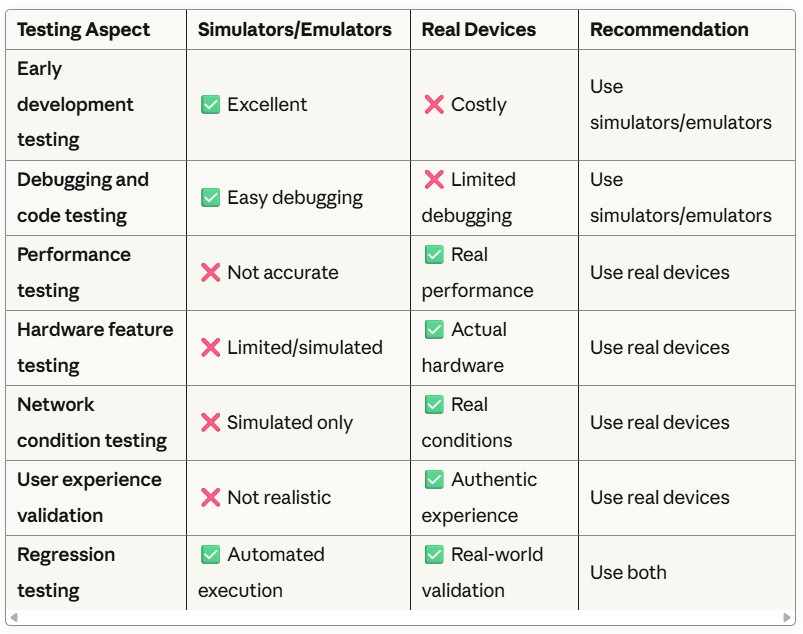
Real Devices vs. Simulators/Emulators
Testing Aspect Simulators/Emulators Real Devices Recommendation Early development testing ✅ Excellent ❌ Costly Use simulators/emulators Debugging and code testing ✅ Easy debugging ❌ Limited debugging Use simulators/emulators Performance testing ❌ Not accurate ✅ Real performance Use real devices Hardware feature testing ❌ Limited/simulated ✅ Actual hardware Use real devices Network condition testing ❌ Simulated only ✅ Real conditions Use real devices User experience validation ❌ Not realistic ✅ Authentic experience Use real devices Regression testing ✅ Automated execution ✅ Real-world validation Use both
Device Coverage Strategy
- [ ] Popular device models (top 80% market share)
- [ ] Various screen sizes and resolutions
- [ ] Different OS versions (current and previous 2-3 versions)
- [ ] Low-end and high-end device performance
- [ ] Different manufacturers (iOS: Apple, Android: Samsung, Google, etc.)
- [ ] Tablets and foldable device considerations
7. Security Testing Checklist
With cybercrime costs expected to reach $265 billion by 2031, security testing is non-negotiable.
Data Protection
- [ ] Data encryption at rest and in transit
- [ ] Secure data storage practices
- [ ] Personal information handling compliance
- [ ] Data backup and recovery security
- [ ] Secure data deletion procedures
- [ ] GDPR/CCPA compliance measures
Authentication and Authorization
- [ ] Strong password policy enforcement
- [ ] Multi-factor authentication support
- [ ] Session management security
- [ ] Biometric authentication security
- [ ] OAuth/SSO implementation security
- [ ] Account lockout mechanisms
Network Security
- [ ] HTTPS implementation and certificate validation
- [ ] API security and rate limiting
- [ ] Man-in-the-middle attack prevention
- [ ] Secure communication protocols
- [ ] Certificate pinning implementation
- [ ] Network traffic encryption
Application Security
- [ ] Code obfuscation and anti-tampering
- [ ] Binary protection measures
- [ ] Root/jailbreak detection
- [ ] Runtime application self-protection (RASP)
- [ ] Secure coding practices validation
- [ ] Third-party library security assessment
Vulnerability Assessment
- [ ] SQL injection prevention
- [ ] Cross-site scripting (XSS) protection
- [ ] Cross-site request forgery (CSRF) protection
- [ ] Input validation and sanitization
- [ ] File upload security measures
- [ ] Information disclosure prevention
8. Compatibility Testing Checklist
Ensuring consistent functionality across the diverse mobile ecosystem is essential for broad user adoption.
Operating System Compatibility
- [ ] iOS versions (current and 2-3 previous versions)
- [ ] Android versions (API levels 21+ recommended)
- [ ] OS-specific feature implementations
- [ ] Update compatibility testing
- [ ] Beta OS version testing
- [ ] Deprecated API handling
Device Compatibility
- [ ] Screen size variations (phones, tablets, foldables)
- [ ] Screen resolution differences
- [ ] Hardware capability variations
- [ ] Processor architecture differences
- [ ] Memory capacity variations
- [ ] Storage capacity differences
Network Compatibility
- [ ] WiFi connectivity scenarios
- [ ] Cellular network variations (3G, 4G, 5G)
- [ ] Network switching behavior
- [ ] Offline/online mode transitions
- [ ] Bandwidth limitation handling
- [ ] Network timeout scenarios
Browser Compatibility (for hybrid apps)
- [ ] WebView versions across devices
- [ ] JavaScript engine differences
- [ ] CSS rendering variations
- [ ] HTML5 feature support
- [ ] Touch event handling
- [ ] File API compatibility
Testing Execution Best Practices
Test Planning and Documentation
- [ ] Comprehensive test plan creation
- [ ] Test case documentation and maintenance
- [ ] Traceability matrix establishment
- [ ] Risk-based testing prioritization
- [ ] Test data management strategy
- [ ] Environment setup documentation
Test Execution Management
- [ ] Test execution scheduling
- [ ] Defect tracking and management
- [ ] Test result documentation
- [ ] Regression testing procedures
- [ ] Release criteria definition
- [ ] Go/no-go decision processes
Quality Metrics and Reporting
- [ ] Test coverage measurement
- [ ] Defect density tracking
- [ ] Performance benchmarking
- [ ] User satisfaction metrics
- [ ] Accessibility compliance scoring
- [ ] Security vulnerability assessment
Conclusion
This comprehensive mobile app testing checklist provides a structured approach to ensuring your app meets the highest quality standards. Remember that testing is not a one-time activity but an ongoing process that evolves with your app and user needs.
The key to successful mobile app testing lies in:
- Risk-based prioritization of testing activities
- Continuous feedback from real users
- Automation of repetitive and regression tests
- Collaboration between development, testing, and business teams
- Adaptation to new technologies and user expectations
By systematically addressing each area in this checklist, you'll significantly increase your app's chances of success in the competitive mobile marketplace while providing users with the quality experience they expect and deserve.