 OTHERS
 Comparison Between Selenium 3 vs Selenium 4

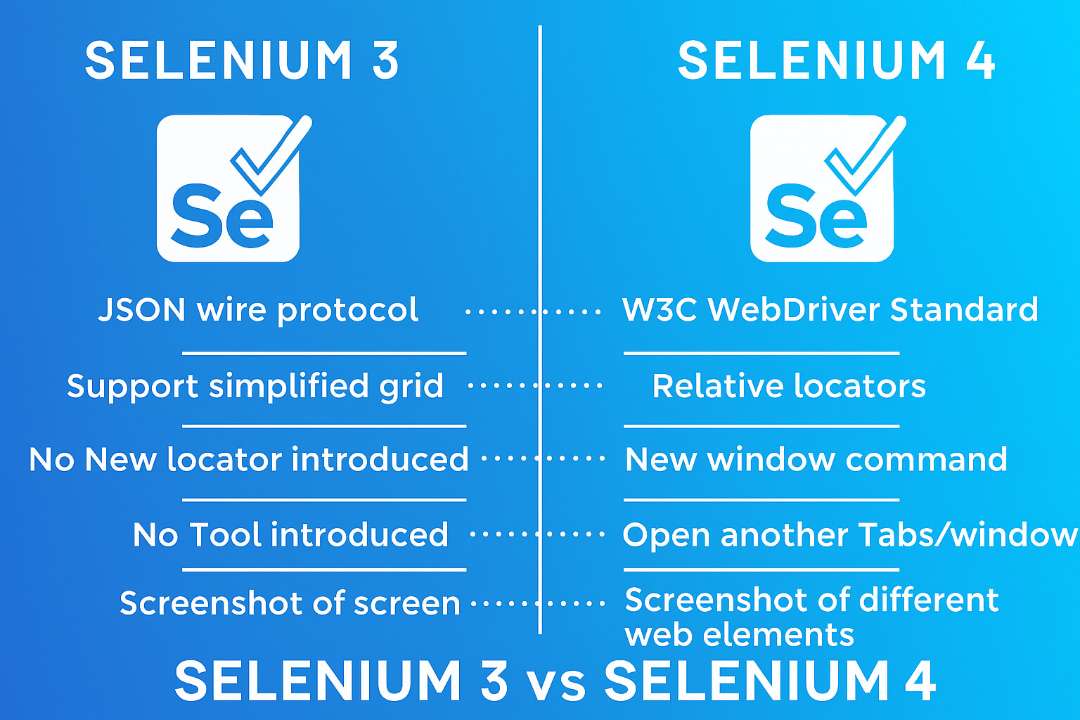
Architectural Evolution: From JSON Wire Protocol to W3C Standard
One of the most profound distinctions in the comparison between Selenium 3 vs. Selenium 4 lies in their underlying communication protocols. This architectural shift significantly impacts how test scripts interact with web browsers, influencing stability, cross-browser consistency, and performance.
Selenium 3's Architecture: The JSON Wire Protocol Era
In Selenium 3, the communication between the Selenium client libraries (your test scripts written in Java, Python, C#, etc.) and the browser-specific drivers (like ChromeDriver, GeckoDriver) was facilitated by the JSON Wire Protocol. This protocol served as a translation layer, converting WebDriver commands into a standardized format that browser drivers could understand, and then sending responses back to the client.
While effective for its time, this architecture introduced an additional layer of complexity. Each browser vendor implemented its driver, which then had to interpret JSON Wire Protocol commands. This often led to inconsistencies across browsers, requiring workarounds for specific browser behaviors and occasionally resulting in flakiness in test execution due to the translation step. Furthermore, if a browser driver deviated from the protocol's interpretation, it could cause unexpected issues, making cross-browser testing more challenging to manage.
Selenium 4's Architecture: Embracing the W3C WebDriver Protocol
Selenium 4 embraces the W3C WebDriver Protocol as its native communication standard, eliminating the need for the JSON Wire Protocol as an intermediary. The World Wide Web Consortium (W3C) established this protocol to standardize how web browsers and automation tools communicate. This standardization means that browser vendors themselves are now responsible for implementing the W3C WebDriver Protocol directly within their browser drivers.
The benefits of this shift are manifold:
Enhanced Stability and Reliability: Direct communication between the Selenium client and W3C-compliant browser drivers reduces the chances of inconsistencies and flakiness, leading to more robust test automation.
True Cross-Browser Compatibility: With all major browsers adhering to a single, official standard, tests written for one browser are more likely to behave identically across others, simplifying cross-browser testing efforts.
Improved Performance: The removal of the JSON Wire Protocol's "translation" layer results in more direct and potentially faster command execution, leading to marginal performance gains in test runs.
Simplified Driver Extensions: In Selenium 3, the ChromeDriver extended the RemoteWebDriver. In contrast, Selenium 4 simplifies this by having the ChromeDriver itself extend the base WebDriver, indicating a more integrated approach.
Streamlined Grid Operations: Selenium 4's architectural changes also impact the Selenium Grid. For standalone execution, manually starting Hub and Node Jars, as was often required in Selenium 3, is generally no longer necessary, as the WebDriver itself can act as a local server.
Redefining Test Execution with Selenium Grid 4
The Selenium Grid is crucial for scaling test automation by enabling parallel execution of tests across multiple machines and browsers. The comparison between Selenium 3 vs. Selenium 4 highlights significant improvements in the Grid's architecture and usability.
The Challenges of Selenium Grid 3
Selenium Grid 3, while functional, presented several challenges for users. Setting up and configuring a Grid often involved complex command-line arguments and manual management of Hub and Node components. Scalability could be cumbersome, and the monitoring interface was basic, making it difficult to gain real-time insights into test execution and resource utilization. This often led to a steep learning curve and operational overhead for teams managing large-scale test environments.
Innovations in Selenium Grid 4
Selenium Grid 4 has been entirely redesigned from the ground up to address its predecessor's limitations, focusing on scalability, ease of use, and improved performance.
Key innovations include:
Simplified Setup and Configuration: Grid 4 offers a much simpler setup process. It can run in a standalone mode, where the same JAR acts as both a Hub and a Node, streamlining local execution. It also supports flexible configuration files (TOML) for more complex deployments.
Enhanced Scalability and Performance: The new architecture is more efficient in handling parallel test execution. It optimizes resource utilization and can scale seamlessly to accommodate a large number of concurrent tests.
Docker and Kubernetes Integration: Selenium Grid 4 boasts native support for containerization technologies like Docker and orchestration platforms like Kubernetes. This allows for dynamic scaling of test infrastructure, spinning up and tearing down browser instances on demand, which is ideal for CI/CD pipelines and cloud-based testing.
Modern User Interface (UI): Grid 4 introduces a vastly improved and user-friendly web UI. This dashboard provides real-time insights into the Grid's status, showing available nodes, ongoing sessions, and queued tests, making monitoring and management significantly easier.
Observability: Enhanced logging and tracing capabilities are integrated, offering better visibility into the Grid's operations and test execution, aiding in debugging and performance analysis.
Advanced Browser Interactions via Chrome DevTools Protocol (CDP)
One of Selenium 4's most exciting features is its native integration with the Chrome DevTools Protocol (CDP). This integration opens up a new realm of possibilities for advanced browser automation and debugging, extending WebDriver's capabilities beyond traditional UI interactions.
Unlocking Browser Capabilities
The Chrome DevTools Protocol is a powerful set of APIs that allow developers to interact with Chrome, Chromium-based browsers (like Microsoft Edge), and Node.js instances at a deep level. With Selenium 4, testers can now leverage these APIs directly from their test scripts, enabling scenarios that were previously complex or impossible with standard WebDriver commands.
Practical use cases for CDP integration include:
Network Emulation: Simulate various network conditions (e.g., 3G, 4G, offline) to test how web applications behave under different bandwidths and latencies. This is crucial for performance and user experience testing.
// Example: Simulate offline network conditions((ChromeDriver)driver).getDevTools().send(Network.emulateNetworkConditions( false, // offline 100, // latency 10000, // download throughput 20000 // upload throughput));Geolocation Testing: Emulate different geographic locations to test location-aware features of web applications without physically moving the test environment.
Performance Monitoring: Access detailed performance metrics, such as page load times, network requests, and rendering statistics, directly from the browser's performance panel.
Intercepting Network Traffic: Block specific URLs, modify network requests, or mock responses for isolated testing of components or handling external dependencies.
Capturing Console Logs and Network Events: Retrieve browser console logs, JavaScript errors, and network request/response details for enhanced debugging and reporting.
Device Emulation: Simulate various mobile devices and screen sizes more accurately.
CDP integration significantly enhances Selenium's debugging and testing capabilities, allowing for more comprehensive and realistic simulations of user environments.
Enhancing Element Location with Relative Locators
Identifying web elements reliably is fundamental to robust test automation. While traditional locators (ID, name, XPath, CSS selector) remain vital, dynamic web pages and complex UI structures can sometimes make element identification brittle. Selenium 4 addresses this by introducing "Relative Locators" (formerly known as Friendly Locators).
The Need for Smarter Locators
In scenarios where an element lacks a unique attribute or its attributes are prone to change, testers often resort to complex and fragile XPath expressions based on its position relative to other elements. This approach can lead to brittle tests that break easily with minor UI changes.
Introducing Selenium 4 Relative Locators
Relative Locators in Selenium 4 allow testers to locate elements based on their visual position relative to a known element. This significantly improves test readability and robustness.
The available relative locators are:
above(): Locates an element visually above a specified element.
below(): Locates an element visually below a specified element.
toLeftOf(): Locates an element visually to the left of a specified element.
toRightOf(): Locates an element visually to the right of a specified element.
near(): Locates an element within a short distance (default 50 pixels) of a specified element.
Example:
// Locate an input field above a 'Submit' buttonWebElement submitButton = driver.findElement(By.id("submit"));WebElement usernameField = driver.findElement(with(By.tagName("input")).above(submitButton));// Locate a link to the left of a 'Next' buttonWebElement nextButton = driver.findElement(By.id("nextBtn"));WebElement previousLink = driver.findElement(with(By.tagName("a")).toLeftOf(nextButton));Streamlined Window and Tab Management
Managing multiple browser windows or tabs is a common requirement in web automation. Selenium 4 introduces a more intuitive and powerful API for this purpose, simplifying complex scenarios.
Traditional Window Handling in Selenium 3
In Selenium 3, handling multiple windows or tabs typically involved retrieving all WindowHandle IDs and then iterating through them to switchTo() the desired window based on its title or URL. While functional, this approach could be verbose and less direct, especially when dealing with newly opened windows.
The New Window API in Selenium 4
Selenium 4 introduces the newWindow() method within the WebDriver.switchTo() interface, which allows creating and switching to a new window or tab without requiring a new WebDriver object. This significantly streamlines the process.
Example:
// Open a new tab and switch to itdriver.switchTo().newWindow(WindowType.TAB);driver.get("https://www.example.com");// Open a new window and switch to itdriver.switchTo().newWindow(WindowType.WINDOW);driver.get("https://www.another-example.com");Other Notable Improvements and Deprecations
Beyond the major architectural and feature enhancements, the comparison between Selenium 3 vs. Selenium 4 also reveals several other significant improvements and changes.
Upgraded Selenium IDE
Selenium IDE, the record-and-playback tool for browser automation, received a substantial overhaul in Selenium 4. It now offers more robust recording capabilities, improved execution reliability, and enhanced export options, including the ability to export tests into WebDriver code for various programming languages. The updated IDE is a valuable tool for quickly prototyping tests and for less technical users.
Desired Capabilities Replaced by Options Classes
Selenium 3 heavily relied on DesiredCapabilities to configure browser-specific settings. In Selenium 4, DesiredCapabilities has been deprecated in favor of more type-safe and structured Options classes (e.g., ChromeOptions, FirefoxOptions, EdgeOptions).
Example (Selenium 4):
ChromeOptions options = new ChromeOptions();options.addArguments("--headless"); // Run Chrome in headless modeWebDriver driver = new ChromeDriver(options);Updates to the Actions Class
The Actions class, used for simulating complex user interactions like mouse movements, drag-and-drop, and keyboard events, has received updates in Selenium 4. While the core functionality remains, some methods have been refined or added to provide a more fluent and comprehensive API for building intricate interaction chains. This includes improved handling of multi-touch actions and better support for modern web elements.
Improved Documentation, Error Handling, and Logging
Selenium 4 brings more comprehensive and up-to-date documentation, making it easier for users to learn and troubleshoot. Additionally, it features enhanced error handling and reporting mechanisms, simplifying the identification and resolution of issues during test execution. Improved logging capabilities further empower QA engineers to diagnose and address problems more efficiently.
Migration Considerations: Moving from Selenium 3 to Selenium 4
While Selenium 4 offers significant advantages, migrating from Selenium 3 requires careful consideration, though the transition is generally smooth due to backward compatibility efforts.
Backward Compatibility
Selenium 4 is largely backward compatible with Selenium 3, meaning many existing test scripts will run without extensive modifications, especially those that primarily use basic WebDriver commands. However, due to the shift to the W3C WebDriver Protocol and deprecation of certain APIs (like DesiredCapabilities), some refactoring may be necessary.
Key Steps for Migration
Update Dependencies: Update your project's dependencies to use Selenium 4 libraries. This typically involves modifying your pom.xml (Maven), build.gradle (Gradle), or requirements.txt (Python).
Review DesiredCapabilities Usage: Replace DesiredCapabilities with their respective Options classes (e.g., ChromeOptions, FirefoxOptions).
Check Actions Class Usage: While many Actions methods remain, review any complex interactions for potential optimizations or minor adjustments.
Adopt New Features Gradually: Once the basic migration is complete, begin incorporating new features like Relative Locators, CDP, and the new Window API to enhance your test suite.
Thorough Testing and Validation: After migration, conduct comprehensive regression testing to ensure all existing functionalities work as expected with Selenium 4.
Potential Challenges and Solutions
W3C Compliance Issues: While rare, some older browser drivers or specific environments might encounter minor compliance issues. Ensure your browser drivers are updated to their latest versions, as they are designed to be W3C-compliant.
Grid Setup Refactoring: If you are using Selenium Grid, migrating to Grid 4 will require refactoring your Grid setup and potentially your CI/CD pipeline configurations to leverage the new architecture.
Learning Curve for New Features: While beneficial, features like CDP and Relative Locators will require some learning and experimentation to integrate effectively into your test suite.
Conclusion: Why Upgrade to Selenium 4?
The comparison between Selenium 3 vs. Selenium 4 unequivocally demonstrates that Selenium 4 represents a substantial leap forward in web automation testing. It addresses long-standing limitations, introduces powerful new capabilities, and aligns the framework with modern web standards and development practices. The adoption of the W3C WebDriver Protocol ensures enhanced stability and true cross-browser consistency, mitigating the flakiness often associated with older versions.
The redesigned Selenium Grid 4 significantly simplifies scalability, making parallel testing more accessible and efficient, particularly for teams leveraging containerization. The native integration with the Chrome DevTools Protocol opens up unprecedented opportunities for advanced debugging, performance analysis, and simulating complex browser conditions. Furthermore, features like Relative Locators and the streamlined Window Management API contribute to more robust, readable, and maintainable test scripts.
For organizations committed to building high-quality web applications, upgrading to Selenium 4 is not merely an option but an imperative. It equips test automation engineers with superior tools to tackle the increasing complexity of web interfaces, accelerate feedback loops, and ultimately deliver higher quality software. By embracing Selenium 4, teams can future-proof their automation strategies, improve efficiency, and achieve greater confidence in their testing efforts.